
Defect Life Cycle
Defect life cycle, represents the journey a defect takes from its discovery to its resolution. This cycle can differ across organizations and projects, influenced by the software testing process and the tools used (such as bug trackers). Common status values during a defect’s life cycle include:
- New: A newly reported defect that is open and requires attention.
- Assigned: The defect has been assigned to a team member for resolution.
- Open: The defect is actively being worked on.
- Fixed: The defect has been resolved and is awaiting validation or closure.
- Retest: The defect is ready to be retested to confirm the fix.
- Reopened: The defect was previously marked as fixed but has reappeared or was not fully resolved.
- Deferred: The defect has been postponed for a future release.
- Rejected: The defect is not valid and has been dismissed.
- Duplicate: The defect has already been reported and is identical to another defect.
- Closed: The defect has been resolved and no further action is needed.
- Not a bug (by-design): The reported issue is not a bug but a feature or intended behavior.
Some teams might use variations or combinations of these values, such as Closed-Fixed or Closed-WontFix.
Customizing the Defect Status Values
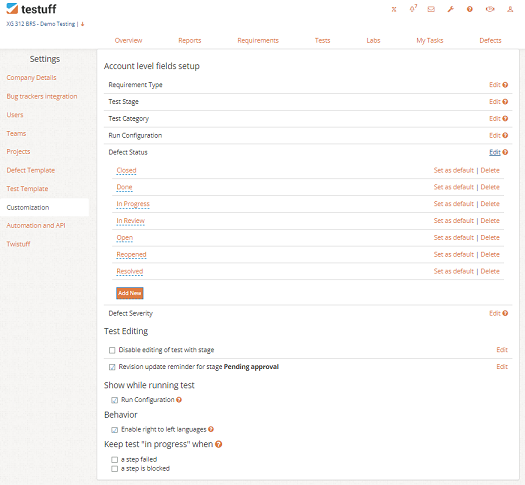
Customizing defect status values allows you to tailor the defect life cycle to match your team’s specific workflow and terminology. While default status values are provided and suitable for most scenarios, they can be modified to fit your project’s needs.
Default status values include:
- New – An open, newly reported defect
- Fixed – The defect has been fixed and is ready for validation or closer
- wontfix – The defect will not be fixed, with an accompanying explanation
- Duplicate – The defect is a duplicate of another reported issue
- worksforme – The defect cannot be reproduced, typically prompting a request for more details to aid in reproduction
- Invalid – The defect was incorrectly reported, with an explanation usually provided
To customize these statuses or add new ones:
- Go to Settings and select the Customization menu option.
- Click the Edit next to the Defect Status under the Account level fields setup.
- Use the Add New to add any new status values your team requires.
- Delete any default pre-set values that don’t suit your team’s defect life cycle.
Desktop-client Note: The process of customization in the desktop client is the same, though navigation may vary slightly.