
 Basecamp Website
 Basecamp Website
How to Integrate Testuff with Basecamp
Testuff can seamlessly integrate with your Basecamp account, allowing you to automatically send every reported defect to Basecamp while continuing to manage your manual tests in Testuff.
Configuring Testuff for Basecamp
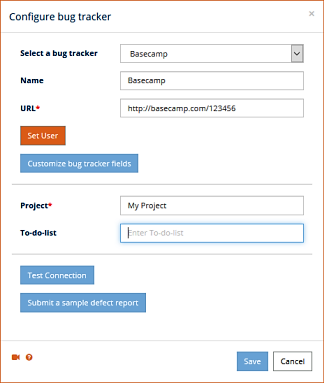
To set up the integration between Testuff and Basecamp, follow these steps:
- Access Bug Tracker Settings:
- In Testuff, go to Settings.
- Select the Bug Trackers menu option.
- Click the Add bug tracker link.
- Select Basecamp:
- Choose Basecamp (or Basecamp OAuth2, if you are using V3 and up) from the bug tracker options dropdown.
- Enter your Basecamp URL in the format https://basecamp.com/Company_ID.
- Set the Default Project. Defects exported from Testuff projects without a custom Basecamp project will use this project name.
- Optionally, set the Default To-Do list if you prefer to send defects from Testuff to your Basecamp To-Do list instead of a Basecamp project. Leave this field empty if not needed.
- Set Up Basecamp Tokens:
- Click Set User to enter your Basecamp tokens. Follow the link provided below the token fields to create your tokens and approve Testuff.
- After creating the tokens, paste them back into Testuff.
- Test the Configuration:
- Click the Submit a sample defect report button to ensure that Testuff can create bug reports in Basecamp. If successful, the new bug report should appear in Basecamp.
- Save Settings: Don’t forget to click SAVE to register the new settings.
Associating a Custom Basecamp Project with a Testuff Project
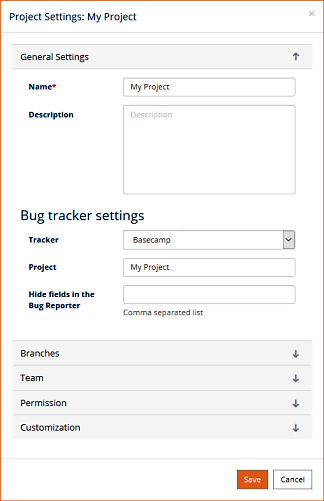
You can link a specific Testuff project to a custom Basecamp project by following these steps:
- Select a Testuff Project:
- In Testuff, go to Settings and select the Projects menu option.
- Choose the project by clicking on the Edit link next to it.
- Configure the Bug Tracker:
- Under the General Settings section within Bug Tracker settings, select Basecamp from the tracker dropdown list.
- Enter the relevant Basecamp project for this Testuff project.
- Save Your Settings: Click SAVE to apply the changes.
Note for Desktop Client Users: The process is similar, but you may need to navigate differently, such as using the “Manage projects” link from the home screen.
For any additional help or questions regarding the integration between Testuff and Basecamp, please contact our support team.