
 Clarizen Website
 Clarizen Website
How to Integrate Testuff with Clarizen
Testuff, a hosted service, can automatically send every reported defect to your Clarizen account. You can run your manual tests in Testuff while continuing to use Clarizen for bug tracking.
Configuring Testuff for Clarizen
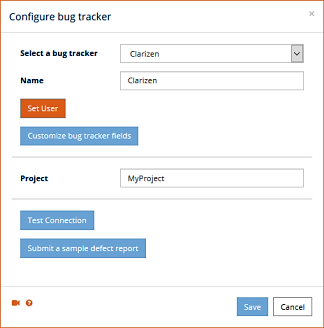
- Access Settings:
- Go to Settings and select the Bug Trackers option.
- The Bug Trackers integration page will appear. Click the Add bug tracker link.
- Select Clarizen: From the Select a bug tracker combo box, choose Clarizen.
- Set Default Project: You can set a Default Project. Defects exported from Testuff projects that do not have a custom Clarizen project will be exported using this project name.
- Enter Clarizen Credentials: Click the Set User button to enter your credentials for your Clarizen account. In the desktop client, this option is labeled Set my Clarizen user.
- Submit a Sample Defect Report: Optionally, click the Submit a sample defect report button to verify that Testuff can create bug reports in Clarizen. If successful, the new bug report will be displayed in your Clarizen account.
- Save Settings: Don’t forget to click the Save button (or OK in the desktop client) to register the new settings.
Adding Custom Fields
The best and easiest way is to click on the Customize bug tracker fields button and use the
Show available custom fields link, then select those you wish to add.
Associating a Custom Clarizen Project with a Testuff Project
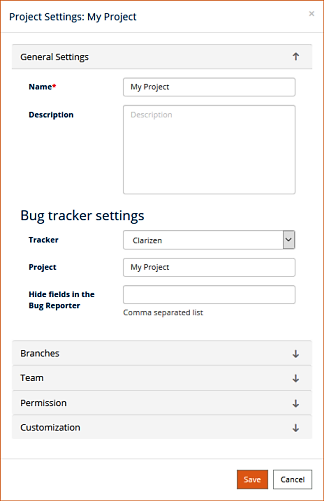
To link a specific Testuff project with a custom Clarizen project, follow these steps:
- Select a Testuff Project:
- In Testuff, go to Settings and choose the Projects menu option.
- Select the project by clicking on the Edit link next to it.
- Configure the Bug Tracker:
- Under the General Settings section, ensure the Tracker field is set for Clarizen.
- Fill in the relevant Clarizen project for this Testuff project.
- Save Your Settings: Click the SAVE button to apply the changes.
For any additional help or questions regarding the integration between Testuff and Clarizen, please contact our support team.