
 Leankit Website
 Leankit Website
How Does Testuff Integrate with LeanKit?
Testuff, a hosted service, seamlessly integrates with your LeanKit account by automatically sending every reported defect. This allows you to manage your manual tests with Testuff while continuing to utilize LeanKit for efficient bug tracking.
How Do I Configure LeanKit with Testuff?
-
Access the Bug Trackers Integration:
- In Testuff, navigate to Settings > Bug Trackers.
- The Bug Trackers Integration page will appear. Click the Add Bug Tracker link.
-
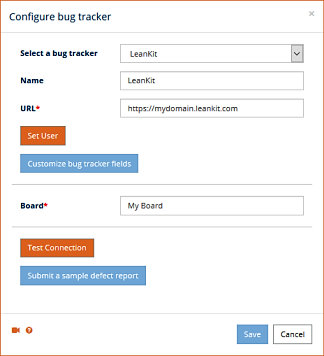
Select and Configure LeanKit:
- Choose LeanKit from the Select a Bug Tracker dropdown menu.
- Enter your LeanKit server address in the URL field, ensuring you only use the base URL (omit any file names after the last slash).
- Set the Default Project. Defects from Testuff projects without a specific LeanKit project will be exported to this default project.
-
Test the Configuration:
- Optionally, click the Submit a Sample Defect Report link to verify that Testuff can create bug reports in LeanKit. If successful, a new bug report will be displayed.
- Click the Save button to apply and save your new settings.
Note: In the desktop client, finalize the setup by clicking OK instead of Save.
Can I Associate a Custom LeanKit Project with a Testuff Project?
Yes, you can associate specific Testuff projects with custom LeanKit projects. If no custom project is set, the default one from the general settings will be used. Here’s how to set it up:
Adding the Project Field to the Bug Reporter
- Navigate to Settings > Bug Trackers in Testuff.
- Add the Project field to the Bug Reporter form.
- When reporting a defect, select the desired LeanKit project from the dropdown.
Establishing a Project-to-Project Relationship
- Go to the Settings > Projects menu.
- Select the project you want to configure by clicking the Edit link next to it.
- Under the General Settings section, ensure that the Tracker field is set to LeanKit and enter the corresponding LeanKit project name for this Testuff project.
- Click the Save button to apply and save your new settings.
Projects without a custom LeanKit project will default to the project specified in the general settings.
For any further assistance with integrating Testuff and LeanKit, please contact us.