
Here’s a great tip if you work a lot with the Windows Command Prompt aka cmd.exe. Wouldn’t you just love it if you could easily copy-paste stuff in the Command Prompt window? Well, you can!
- Open the Windows Command Prompt via Start > Run > type cmd > OK.
- Right click it on the task bar and choose Properties.
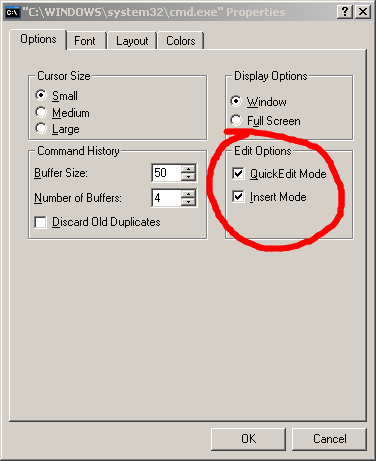
- In the Options tab, make sure Quick Edit Mode and Insert Mode are both checked:
- Press OK.
- The Apply Properties dialog will appear. Choose the second options, Save properties for future windows with same title, and press OK.
- Copy text in the Windows Command Prompt by holding down the left mouse button, marking the relevant text, and pressing ENTER.
- Paste text by pressing the right mouse button.
Done! Now you may:
BTW, if you like this post or any other post that I wrote, please help me spread the good word by bookmarking the post in digg, delicious, or reddit. Small icons are available at the bottom of each post for easy bookmarking. Thanks!