
Customizing the Defect Description
The Defect Template feature allows you to customize the defect description to fit your organization’s standards.
The default template automatically generates a basic defect description using the information provided when reporting a defect. You can keep the default settings or customize the template to suit your needs.
Steps to Customize the Defect Template
- Go to Settings->Defect Template. The editor will display the default defect template.
- Enter the fields you want to include in your defect report using the available tags (listed below).
- Use the Preview tab to test your entry.
Tag format is #TAG_NAME,Prefix# (adding the comma is mandatory)
For example: Assume LAB name is Cycle 1.0
- #LAB,# will generate “Cycle 1.0”
- #LAB, My lab:# will generate “My lab: Cycle 1.0”
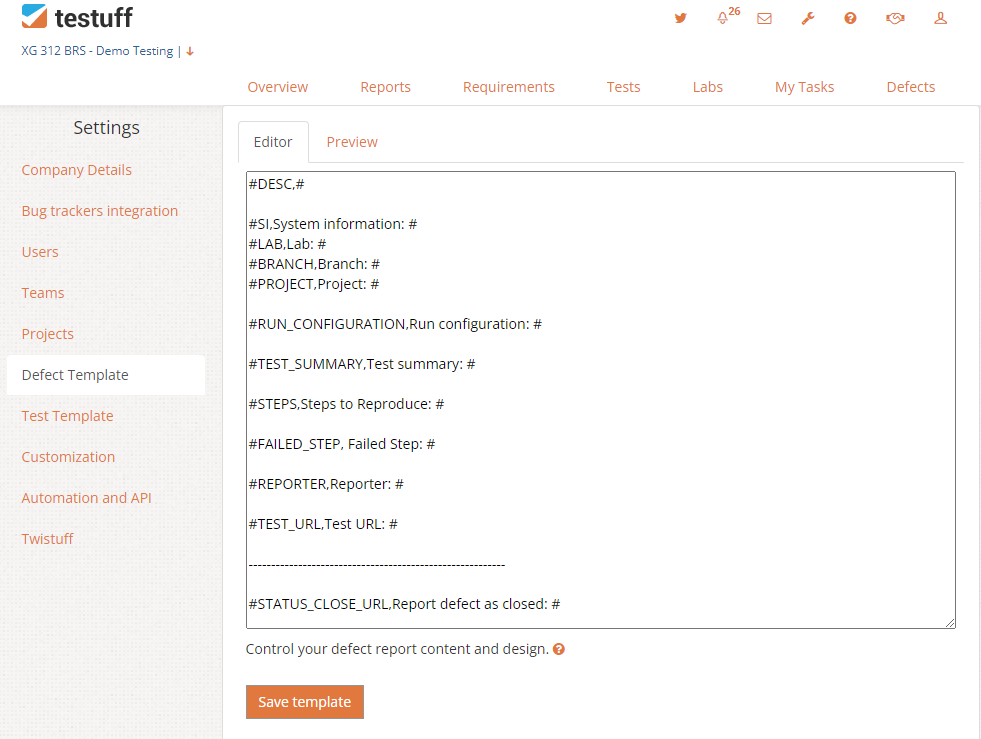
Available Tags for Customization
Bug Reporter Tags:
- DESC – description
- SI – system information
- BRANCH – branch name
- PROJECT – project name
Test Tags (only if the defect was reported while running a test):
- LAB – lab name
- TEST_SUMMARY – title of the test
- RUN_CONFIGURATION – run configuration details
- STEPS – all test steps
- PRECONDITIONS – The test preconditions
- FAILED_STEP – only steps marked as failed
- REPORTER – name of defect reporter
- STATUS_CLOSE_URL – Report defect as closed from the tracker
- TEST_URL – The URL of the test
The Default Template
By default, Testuff uses the following template:
#DESC,#

#SI,System information: #
#REPORTER_PARAMS, #
#LAB,Lab: #
#BRANCH,Branch: #
#PROJECT,Project: #
#TEST_URL, #

#TEST_SUMMARY,Test summary: #
#RUN_CONFIGURATION,Run configuration: #

#STATUS_CLOSE_URL,Report defect as closed: #