
What is Run Configuration?
Run Configuration allows you to specify the environment or configuration on which tests are executed. This feature enhances test process management and helps in pinpointing bugs within specific configurations.
How do I setup a Run Configuration?
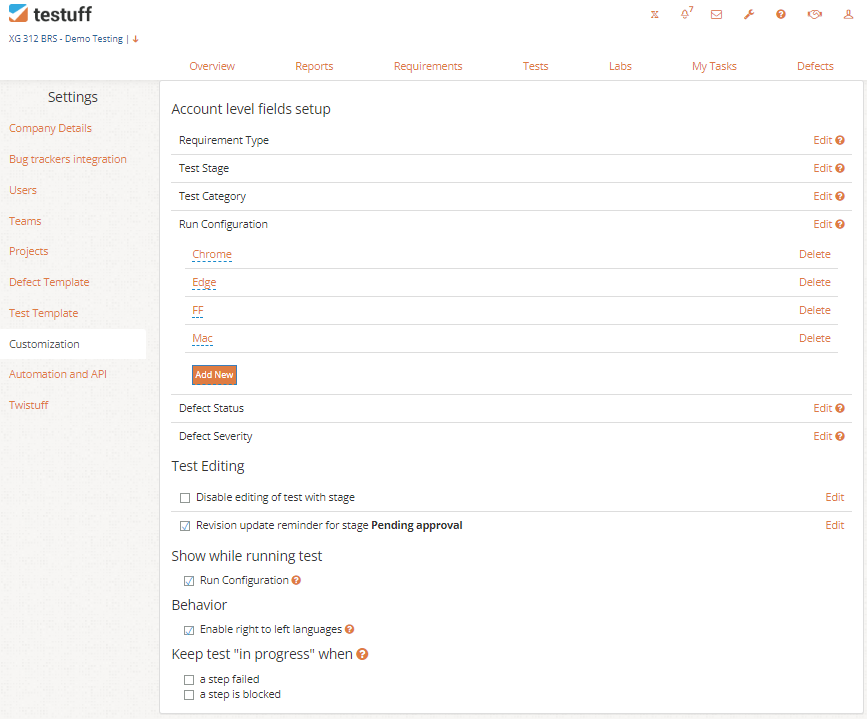
- Navigate to Settings.
- Select the Customization tab.
- In the Account Level Fields Setup section, click the Edit link.
- Tick the checkbox for Run Configuration to enable it.
- You can now create and manage your Run Configuration values list.
How do I use Run Configuration
- Per Test Assignment: Assign a specific Run Configuration to each test to ensure it is linked to the correct environment. During a test run in the Test Runner, click on the More Actions (three dots) menu, then select Change Configuration from the Set Configuration window.
- In Labs: When assigning tests in the Labs area, you can select one or more configurations for the assigned tests, creating different runs with varying configuration values.
- Editing During Testing: You can modify or add new configurations while running a test by clicking the Edit icon next to the configuration data in the Test Runner.
Separate Value Lists for Projects
You can have different configuration value lists for different projects. Go to Settings, select Projects, choose your project, and click Edit. In the Customization section, edit the configuration values for that specific project. These will override the global list for that project.
Viewing Run Configuration Information
Run Configuration details are saved for each test run and can be found in the run history. This information is also included in all defect reports and exported to your bug tracker.
Product Version
What is Product Version?
The Product Version feature allows you to specify the version of the application under test. This helps in managing test processes more efficiently and in identifying bugs specific to particular versions.
How to Activate Product Version
- Go to Settings.
- Select the Customization tab.
- Tick the checkbox to activate the Product Version feature.
How to Use Product Version
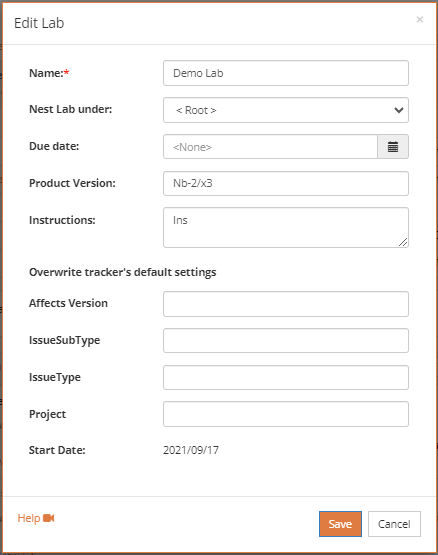
Lab Assignment: Assign a Product Version to an entire Lab, ensuring that all tests within the Lab are linked to the same application version. The assigned version can be overwritten on a per-test basis if needed. Testuff will remember the last assigned version as the default for subsequent tests unless changed.
Viewing Product Version Information
Product Version information is saved for each test run, and can be found in the test run history. It is also included in all defect reports and is exported to your bug tracker.