
What is a soft link?
A soft link is a reference to a test, allowing you to link existing tests to multiple suites (like a ‘shortcut’ or ‘alias’ for Win and Mac users). This helps you organize and reuse tests across different testing scenarios without duplicating them.
How do I create a soft link?
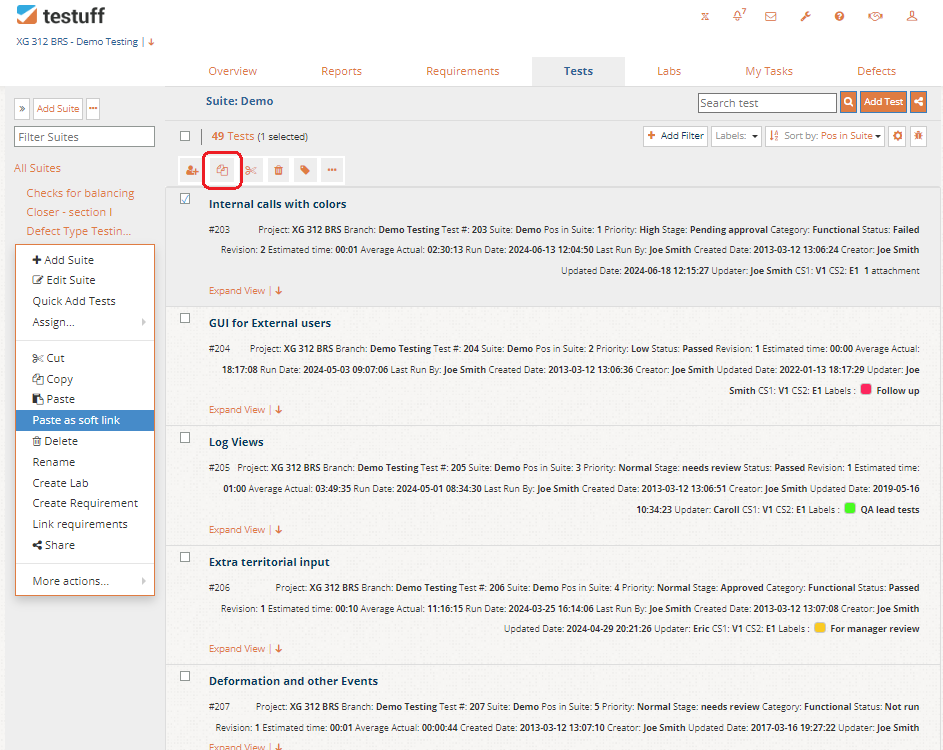
To create a soft link copy one or more tests and use the Paste as soft link option available through the Suite’s menu. This can be done across branches and even across different projects.
How can I use soft links to improve my testing?
Soft links can be leveraged in various scenarios to enhance your testing process. For example:
- Sanity Suites for ‘Must-Have’ Tests in Each Release:
- Create a suite called Sanity.
- Copy all ‘must-have’ tests, from various suites, into the Sanity suite as soft links.
- Assign the Sanity suite to testers in Labs.
- Virtual Groups of Tests for Specific Releases:
- Add a new suite, for example, ‘release 1.2’.
- Copy tests into the new suite as soft links.
- Assign the new suite to testers in Lab view.
- Mark this suite as a requirement to track its status in the Requirements tab.
What happens when I edit the test / soft link?
A soft link is simply a reference to the original test. If you edit the test, the soft link will automatically reflect those changes. Conversely, if you update the soft link, the original test will be updated as well.
When I delete a soft link, will my test get deleted too?
No. Deleting a soft link only removes the reference, not the test itself. However, if you delete the original test, all associated soft links will automatically be removed.