What are test parameters?
Test Parameters are placeholders for actual values. They allow you to write test cases and steps that testers can execute with specific variations of different values. These parameters enable the creation of multiple test step variations, each with different values. This increases the flexibility of your tests by allowing the same step to be run repeatedly with different data values.
How do I work with test parameters?
In Testuff you can add parameters within the test steps, and/or expected results. Testuff will then generate steps for the test, each using a value from the list of parameter values.
A few notes:
- Parameter Syntax: Add the values inside double braces (curly brackets) `{{ }}`. There’s a special icon to insert all four brackets in one action.
- Separation: Separate multiple values with commas, with no spaces required.
- Matching Values: Values in a step should correspond to their respective values in the expected results for that step.
- Empty Values: You can include empty values by adding two commas (with actual values before and after).
- Step-specific Parameters: Parameters are related to specific steps and are treated separately in each step.
- Placement Flexibility: You can add parameter values in the steps, expected results, or both—whatever suits your testing needs.
Example: Testing Login Functionality
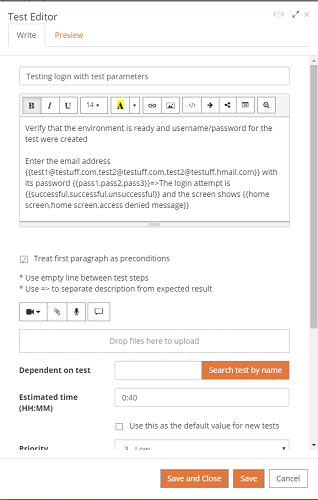
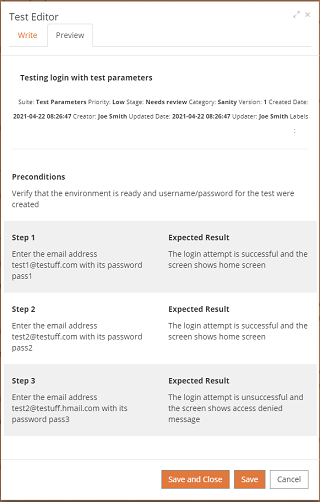
When testing a login feature, you may want to verify the functionality with different combinations of email addresses and passwords. You’d test to ensure valid credentials work and invalid ones are correctly rejected.
The following screenshots illustrate how this test would appear in the Test Editor and the resulting actual test steps:
Another Example: Testing the Testuff Test Runner
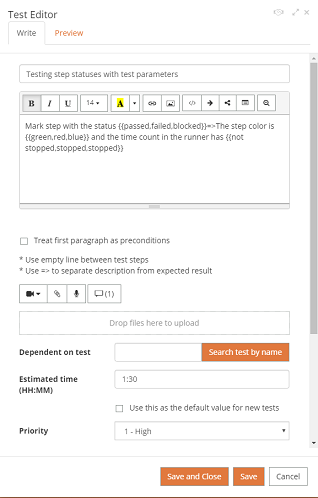
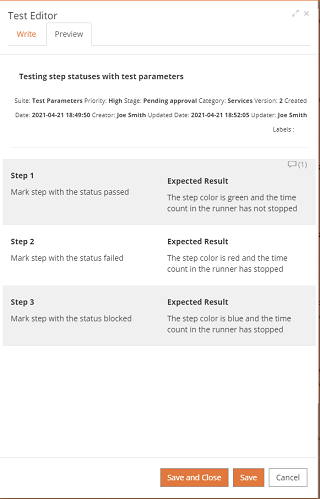
Let’s consider another example: testing the Testuff Test Runner to verify the colors of steps after they’re marked with a status. The screenshots below demonstrate how the test should be written and the expected results: